Craft ICEMAKER Not Harvesting
If the customers complaint is that the Craft Icemaker is not cycling / harvesting at all, the below should be checked…
- Temperature
- Power
- Test Mode
- Physical Damage
*Note: It takes 24-48hrs after plug in for the Craft Icemaker to start making ice. And from that point it will make 3 to 6 balls of ice every 18-30hrs.
1) Temperature
Check the temperature of the freezer section. It is best to do this when you open the door for the first time for the most accurate reading.
The Freezer temperature should be close to set point, recommended setting is 0°F. There is a sensor on the icemaker that needs to read 14-19°F for the icemaker to cycle.
If the temperature in the Freezer is close to set point then test the sensor from the Main PCB to make sure it is reading properly.
Sensor Chart is below…
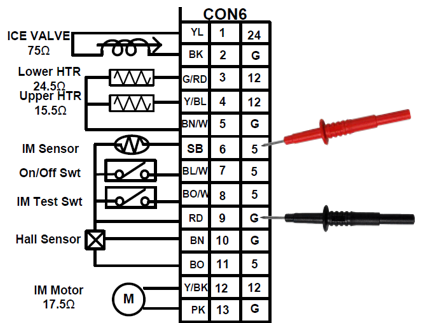
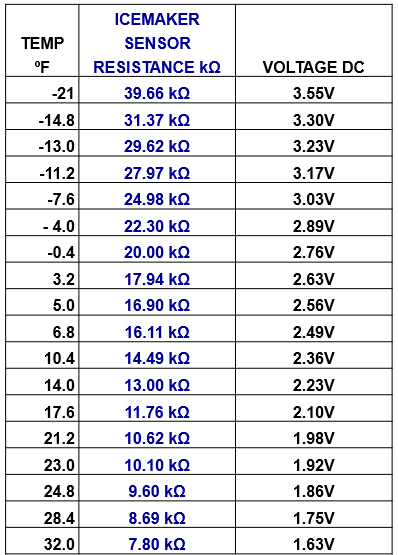
If the temperature in the freezer is incorrect then troubleshoot cooling issue.
If the temperature in the freezer is correct but sensor is reading out of range replace the Craft Icemaker.
2) Power.
Make sure the Craft Icemaker is powered on. Most models will have a physical power button on the icemaker itself:
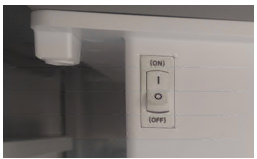
If there is not a physical power button located on the icemaker then there will be an on/off selection on the Control Panel:
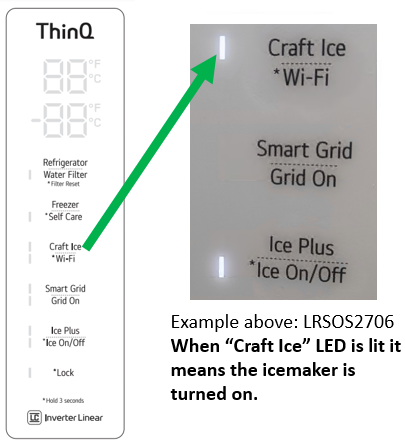
3) Test Mode.
If the Craft Icemaker will not cycle on its own but temperature is correct and you have made sure the Power is turned on, then try cycling the icemaker in Test Mode.
There is a test button located on the bottom of the Icemaker as shown below:
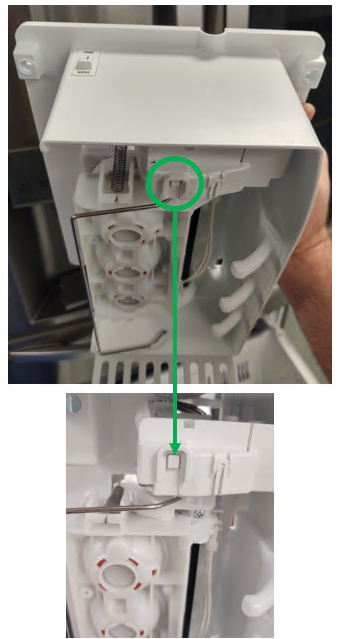
To activate Test Mode press and hold the test button for 3-5 seconds or until the icemaker starts to cycle.
If the icemaker motor does not move at all after holding the test button for 3-5 seconds, check to see if the test button is working at the Main PCB…
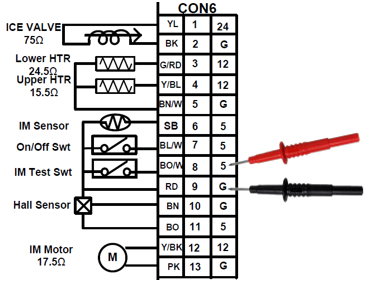
When testing there should be 5Vdc present at all times to the test switch, the 5Vdc should drop to 0Vdc when the test button is pressed or held.
If the 5Vdc is present at the Main PCB but not dropping to 0V when pressing the test button then check for wiring connection issues, bent pins, etc. If no issues are found replace the Craft Icemaker.
If the test button is working and the icemaker motor does not move at all check to see if the Main PCB is outputting 12Vdc to the motor:
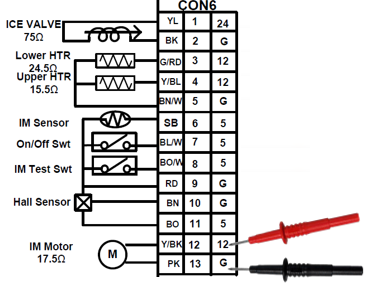
If the Main PCB is not outputting 12Vdc to the motor replace the Mian PCB.
If the Main PCB is outputting 12Vdc to the motor but the icemaker is not rotating, check for wiring issues and if none are found replace the Craft Icemaker.
4) Physical Damage.
Always check to see if the icemaker has any kind of physical damage. Be sure to check the icemaker body and wiring connector.
The Craft ice maker has a feeler arm to determine if its ice bin is full, if this is damaged or not working properly it will think the bin is full and will not harvest.
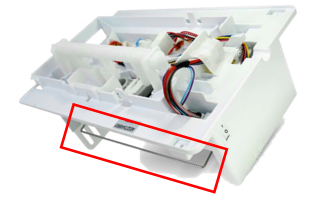
If the icemaker will not cycle at all, check all your connections at the icemaker and main board, also check the pins in the cabinet and connectors to see if any are bent, there have been many of these found and have been the cause of Craft icemaker not operating properly.
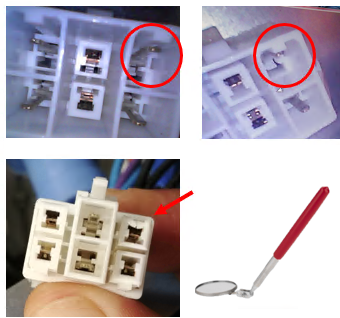
It may be necessary to use an inspection mirror or something else to see the issue.
If the Craft Icemaker is Making Loud popping noises when trying to cycle or is frozen closed to the point it cannot cycle check for Service Bulletins. Some Models have bulletins with updated parts and software updates to resolve these issues.
Water is coming well. The craft ice maker made only 3 ice ball and no more making. I tested the craft ice maker that is working well. What’s the problem?
James,
If the icemaker is filling and working in test mode, verify that the freezer temperature is set correctly. Keep in mind that it takes 18–30 hours to produce Craft Ice. If ice production seems too slow, you can adjust the setting to “6 ICE.”
For more details, see: https://lgrepaircenter.com/craftoperation2/.
If all settings check out and the issue continues, replace the Craft Icemaker and update the software if needed.
Thanks,